Setting up an IVR menu in Dialogue Studio
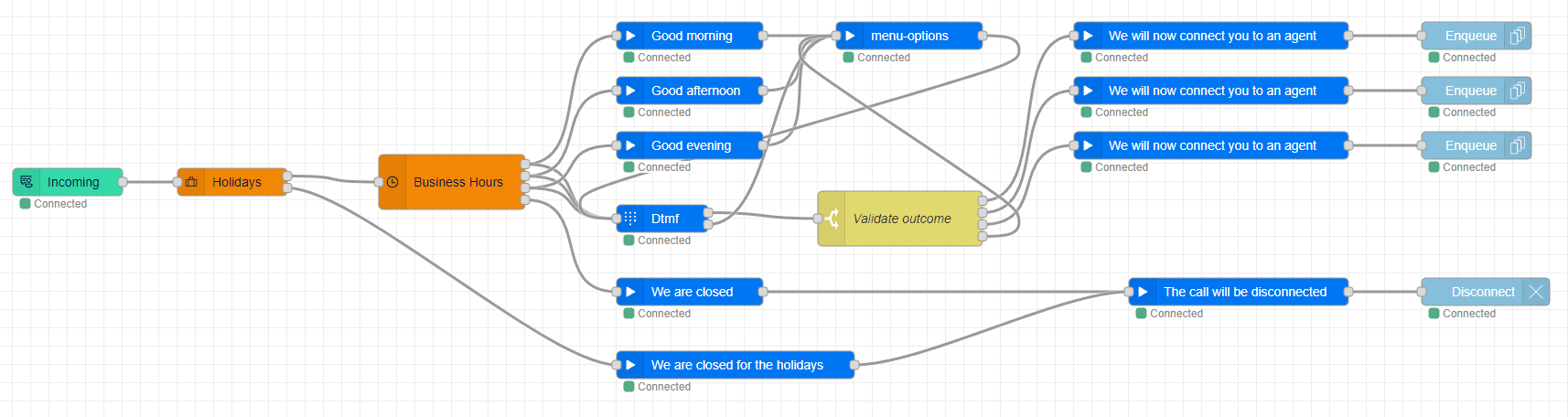
This guide will walk you through the process of adding an Interactive Voice Response (IVR) menu to your callflow. You can either continue with the flow you created in the previous guide or copy the JSON from the Flow example.
Tip
If you prefer not to follow the step-by-step guide, you can still get started quickly by downloading the Flow example at the end of this article. This will give you a clear idea of how the process works, and you can use it as a starting point to customize your own flow.
Prerequisites
Before you start building your IVR menu, you need to make sure you have multiple contact centers to choose from. To do this, you can add more contact centers in the admin portal. Follow the steps on Recurring Operation: Create Contact Center
Note
Not every contact center needs an address. If you're using Dialogue Studio, you can link one address to different contact centers that don't have an address.
Step 1: Add a DTMF node
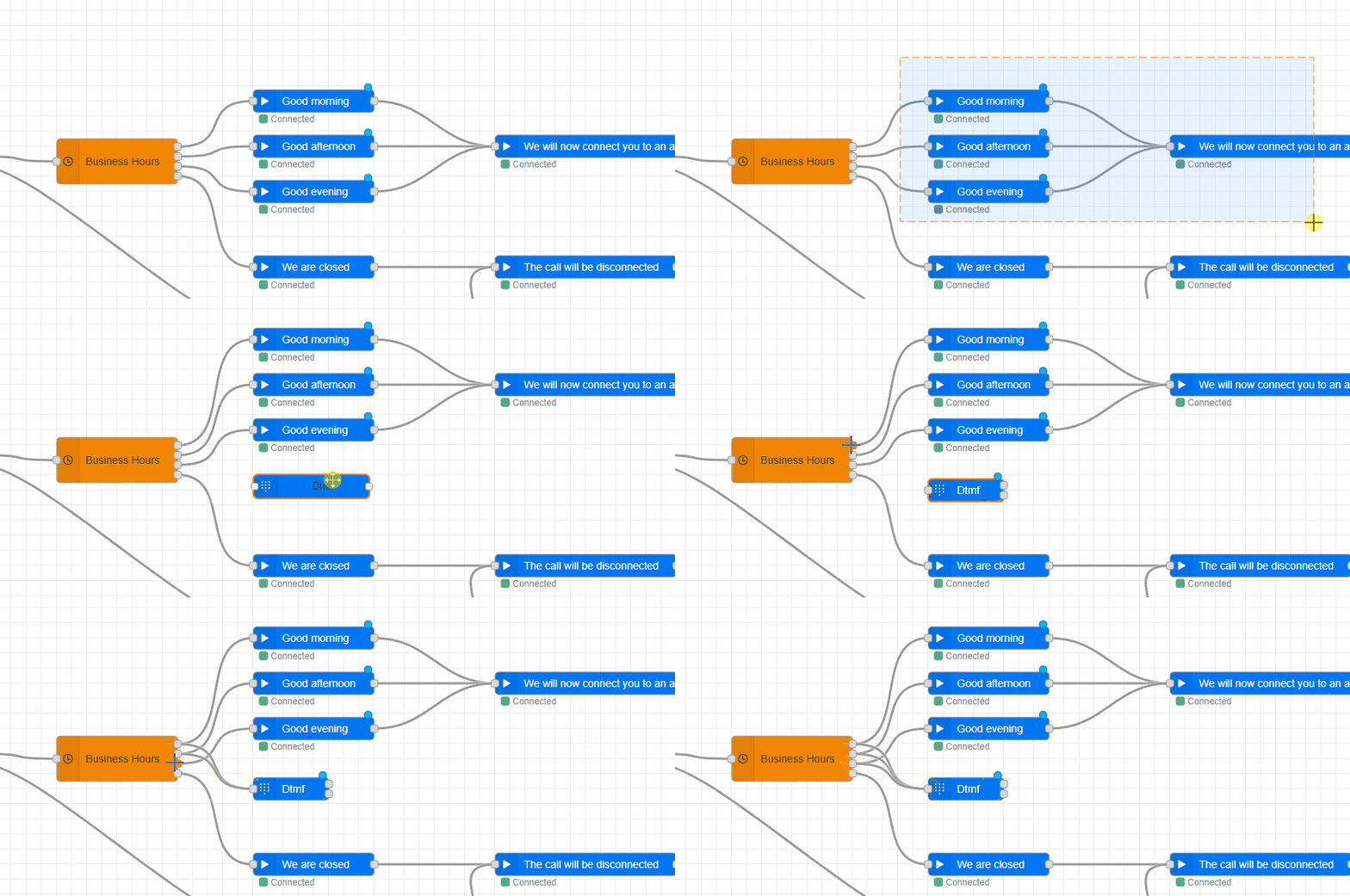
We will be using DTMF tones for the customer to make a selection. Follow these steps to add a DTMF node:
- Drag the node after the Business Hours node.
- By default, the DTMF node will wait for 1 tone and time out in 30 seconds. You can change this by double-clicking on the node.
- Link the outputs of the Business hours node to the DTMF node, except the outside business hours one.
Note
We are putting the DTMF in parallel with the greeting files so that the customer can enter a DTMF tone during the greeting.
Step 2: Unlink the existing Enqueue node and add more options
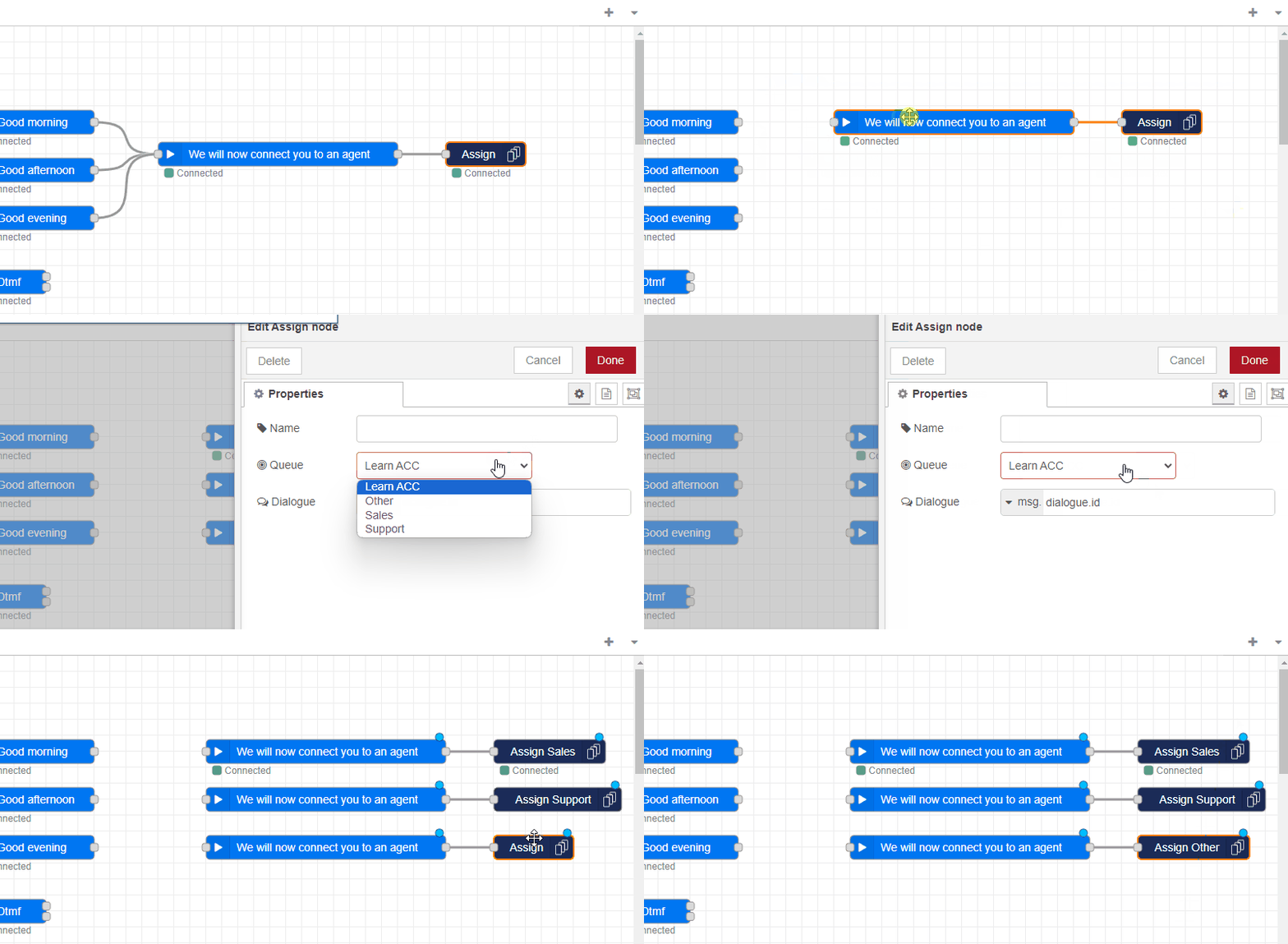
Right now, we already have one option, but we want more. Follow these steps to add more options:
- Unlink the current option from the greeting.
- Drag and drop more options or copy and paste them.
- In this example, we will have three options: 1. Sales, 2. Support, 3. Other questions.
Tip
You can use the "Name" property to label the node.
Step 3: Play the menu
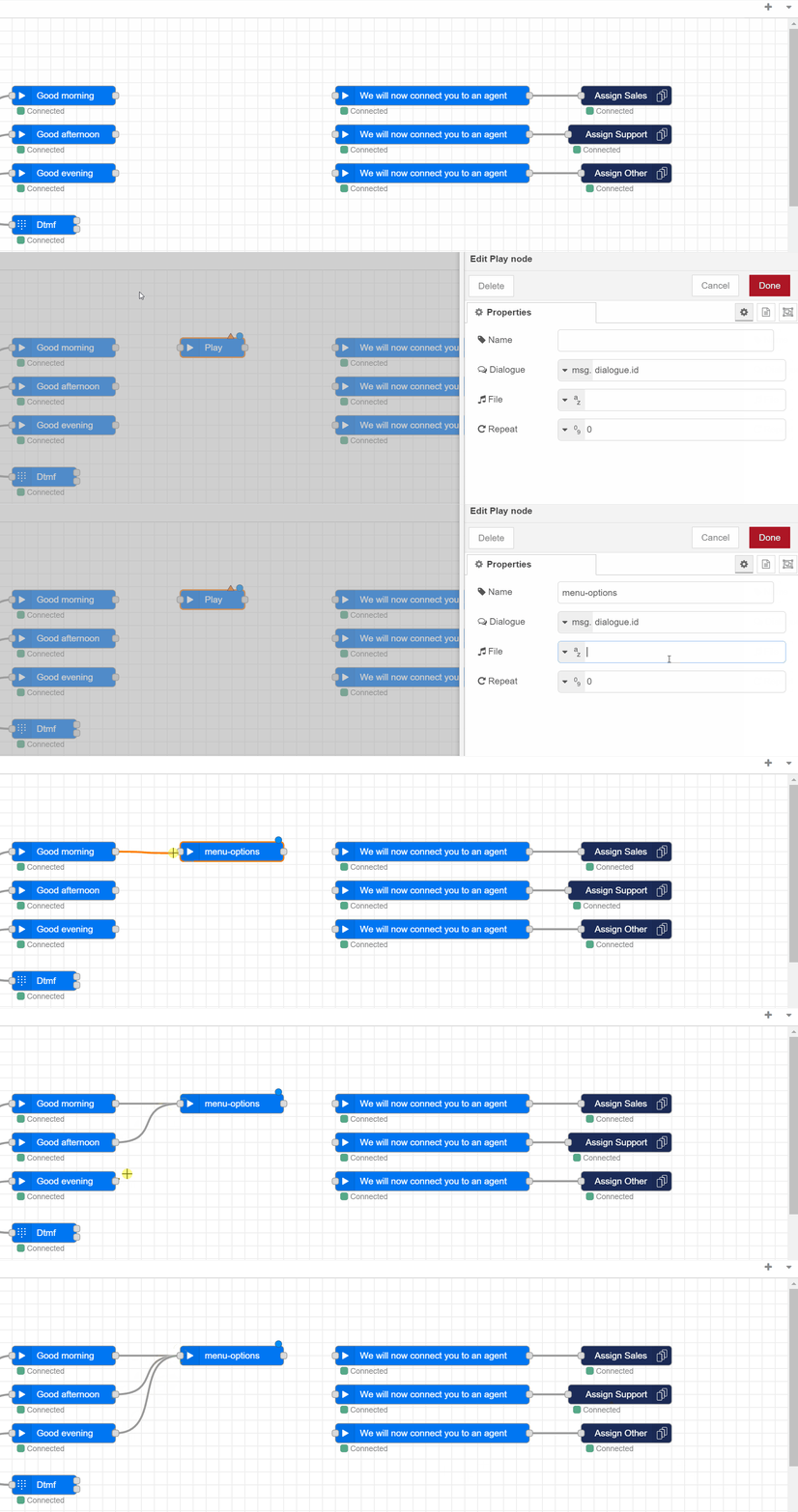
We want to inform customers about the options, so we will be using another Play node. Follow these steps:
- Drag and drop a Play node after the greetings and double-click to configure.
- Enter the URL to a WAV file.
In this example, we will be using a single file that plays all options. - Link all greetings to the newly created Play node.
Tip
By using the Say node, you can use Text to Speech to create a flexible menu, instead of re-recording a WAV file.
Step 4: Validate the customer output
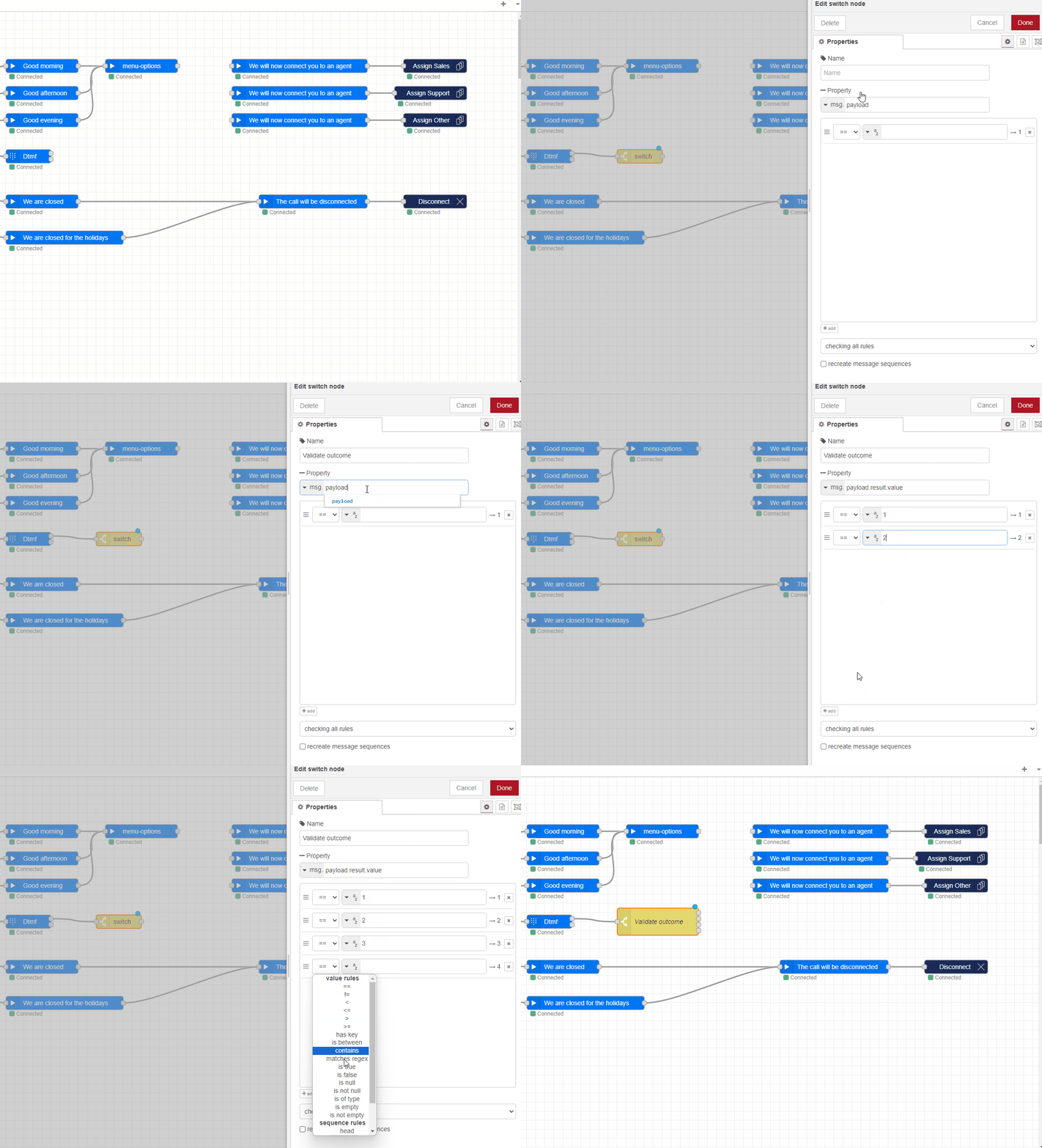
Based on the DTFM tone the customer enters, we need to make a choice. This can be done with a Switch node. We also want to catch if the customer enters an invalid choice. In that case, we want to replay the menu options. Follow these steps:
- Drag and drop a Switch node after the DTMF node.
- Double-click the Switch node to configure it.
- For the property, we are going to check:
- Add the following rules:
- ==1
- ==2
- ==3
- otherwise
Step 5: Link outcome rules to the options
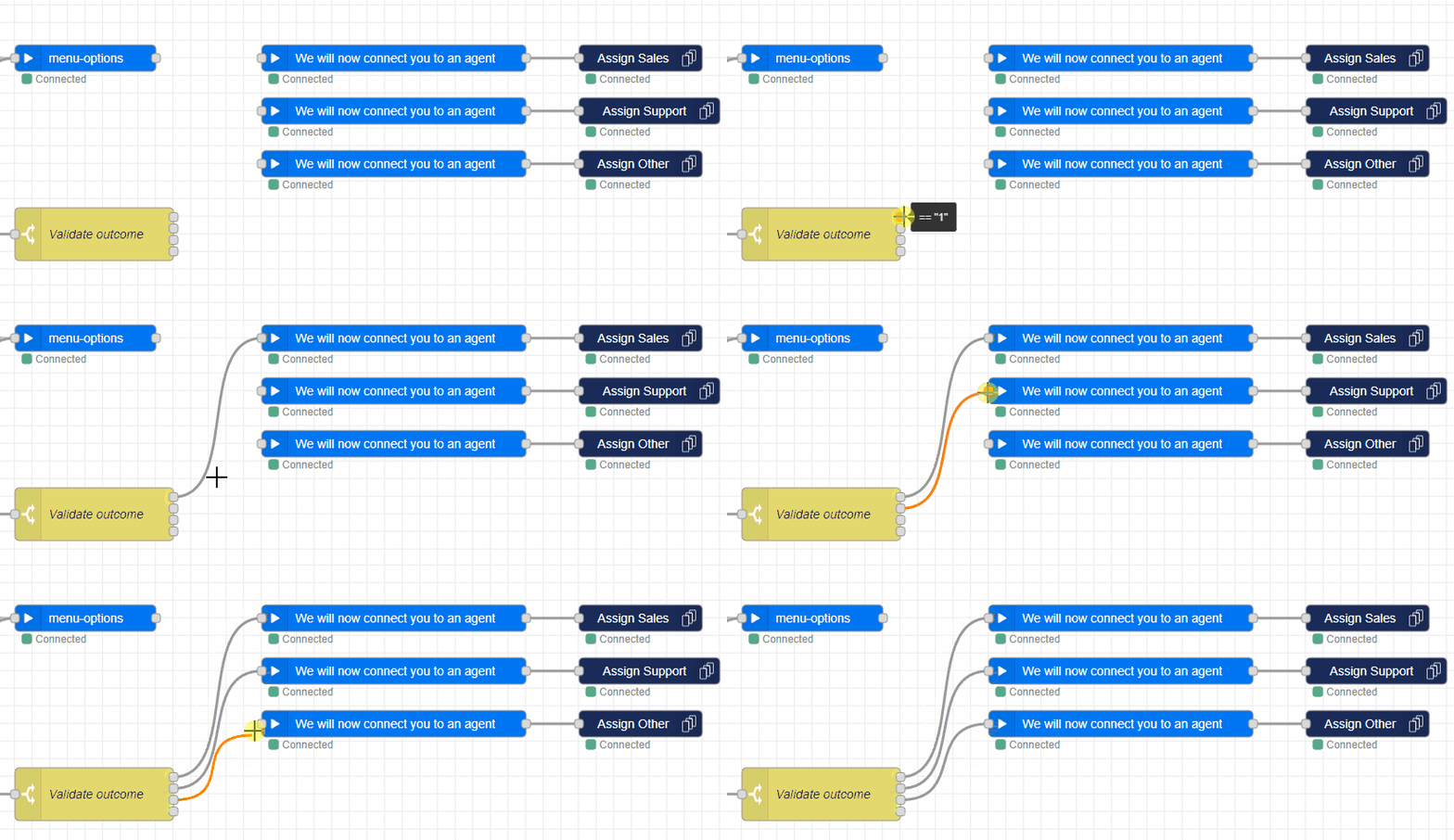
Now, we need to link the right rules to the right options. Follow these steps:
- Drag and drop the outcomes of the Switch node to the right Play and Enqueue nodes.
Step 6: Tie Up Loose Ends
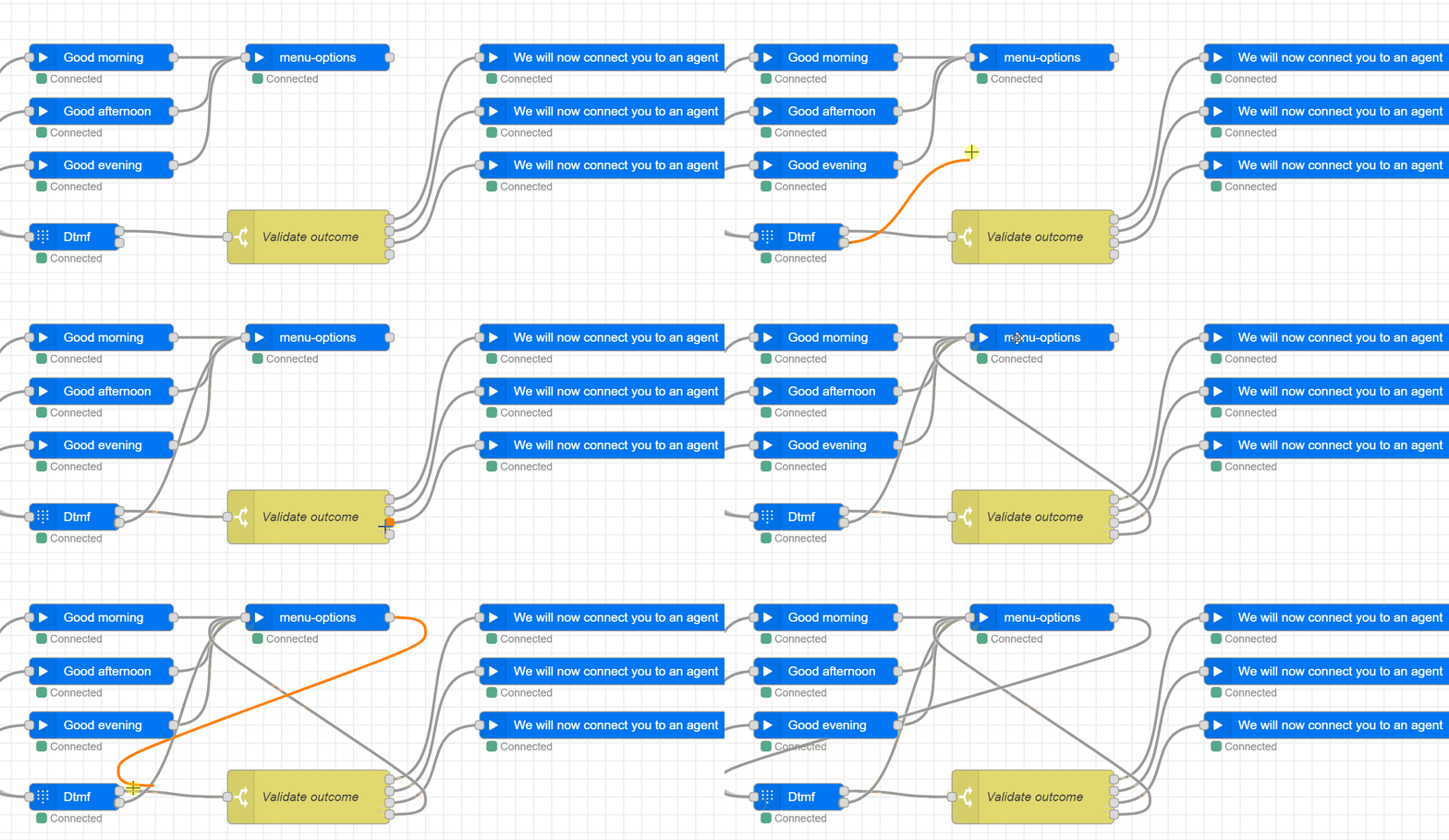
Finally, we want to tie up the loose ends. These are when the customer doesn’t make a choice or selects an option that isn't mentioned, in this case, we are going to play the menu options again.
Note
Alternatively, you could also disconnect the conversation by linking them to the Disconnect node
Step 7: Deploy and Test
Click the Deploy button in the top right corner to deploy the call flow. After clicking this, the call flow is live and you can now call the address you assigned to test. If everything works as expected, and you call during business hours, you should hear the greeting and the menu option. After pressing the DTMF tone you will be connected to the selected option. Congratulations, you have now set up an IVR menu in Dialogue Studio!
Flow example
To use the JSON file to compare your callflow or use it as a baseline, follow these steps:
-
Click on the menu button in the top right corner or use the Ctr+I shortcut to open the Import window.
-
Paste the content of the JSON into the field.
-
(Optional) Click "New Flow" if you want to import the Callflow into a different tab.
-
Click "Import".
Once imported, configure the Incoming and Enqueue nodes with the address and queue you want to use.
[{"id":"ed1a1487fa671bde","type":"tab","label":"Learn - Setup an IVR menu","disabled":false,"info":"","env":[]},{"id":"ca12d52f1eace396","type":"anywhere365-incoming","z":"ed1a1487fa671bde","name":"","address":"bc57cd8d-e625-4006-af08-6f2d79676d41","x":220,"y":280,"wires":[["f365675421cf10ef"]]},{"id":"c1eded3fe02162b3","type":"anywhere365-play","z":"ed1a1487fa671bde","name":"Good morning","dialogueId":"dialogue.id","dialogueIdType":"msg","audioSource":"audio-source-url","valueUrl":"https://dialoguestudio.anywhere365.io/media/learn-examples/good-morning.wav","valueUrlType":"str","repeat":"0","repeatType":"num","x":900,"y":120,"wires":[["ee07d3244e28037f"]]},{"id":"d299032ef90ce154","type":"anywhere365-play","z":"ed1a1487fa671bde","name":"We will now connect you to an agent","dialogueId":"dialogue.id","dialogueIdType":"msg","audioSource":"audio-source-url","valueUrl":"https://dialoguestudio.anywhere365.io/media/learn-examples/we-will-now-connect-you-to-an-agent.wav","valueUrlType":"str","repeat":"0","repeatType":"num","x":1470,"y":120,"wires":[["572400ed62ebb731"]]},{"id":"dd07dfb831dae89b","type":"anywhere365-settings-bh","z":"ed1a1487fa671bde","name":"","timezone":"Europe/Amsterdam","timezonefilter":"Europe/Amsterdam","businessHours":[{"operator":"weekdays","operands":{"days":[true,true,true,true,true,false,false],"startTime":{"type":"time","value":"09:00"},"endTime":{"type":"time","value":"12:00"}},"label":"Monday, Tuesday, Wednesday, Thursday, Friday (09:00-12:00)"},{"operator":"weekdays","operands":{"days":[true,true,true,true,true,false,false],"startTime":{"type":"time","value":"12:00"},"endTime":{"type":"time","value":"18:00"}},"label":"Monday, Tuesday, Wednesday, Thursday, Friday (12:00-18:00)"},{"operator":"weekdays","operands":{"days":[true,true,true,true,true,false,false],"startTime":{"type":"time","value":"18:00"},"endTime":{"type":"time","value":"21:00"}},"label":"Monday, Tuesday, Wednesday, Thursday, Friday (18:00-21:00)"},{"operator":"otherwise","operands":{},"label":"otherwise"}],"stopOnFirstMatch":true,"time":"","timeType":"msgInput","outputs":4,"x":640,"y":280,"wires":[["c1eded3fe02162b3","caa97175ce049771"],["c3e1b8cbe4bd0c9b","caa97175ce049771"],["22febc36828c1f38","caa97175ce049771"],["4b3c015ef4f4e1bd"]]},{"id":"c3e1b8cbe4bd0c9b","type":"anywhere365-play","z":"ed1a1487fa671bde","name":"Good afternoon","dialogueId":"dialogue.id","dialogueIdType":"msg","audioSource":"audio-source-url","valueUrl":"https://dialoguestudio.anywhere365.io/media/learn-examples/good-afternoon.wav","valueUrlType":"str","repeat":"0","repeatType":"num","x":900,"y":180,"wires":[["ee07d3244e28037f"]]},{"id":"22febc36828c1f38","type":"anywhere365-play","z":"ed1a1487fa671bde","name":"Good evening","dialogueId":"dialogue.id","dialogueIdType":"msg","audioSource":"audio-source-url","valueUrl":"https://dialoguestudio.anywhere365.io/media/learn-examples/good-evening.wav","valueUrlType":"str","repeat":"0","repeatType":"num","x":900,"y":240,"wires":[["ee07d3244e28037f"]]},{"id":"4b3c015ef4f4e1bd","type":"anywhere365-play","z":"ed1a1487fa671bde","name":"We are closed","dialogueId":"dialogue.id","dialogueIdType":"msg","audioSource":"audio-source-url","valueUrl":"https://dialoguestudio.anywhere365.io/media/learn-examples/we-are-closed-for-today.wav","valueUrlType":"str","repeat":"0","repeatType":"num","x":900,"y":400,"wires":[["1dfb7fb46035062c"]]},{"id":"1dfb7fb46035062c","type":"anywhere365-play","z":"ed1a1487fa671bde","name":"The call will be disconnected","dialogueId":"dialogue.id","dialogueIdType":"msg","audioSource":"audio-source-url","valueUrl":"https://dialoguestudio.anywhere365.io/media/learn-examples/the-call-will-be-disconnected.wav","valueUrlType":"str","repeat":"0","repeatType":"num","x":1500,"y":400,"wires":[["b26eb6b86f542d0f"]]},{"id":"b26eb6b86f542d0f","type":"anywhere365-disconnect","z":"ed1a1487fa671bde","name":"","dialogueId":"dialogue.id","dialogueIdType":"msg","x":1770,"y":400,"wires":[]},{"id":"1ec9f5a0877da31f","type":"anywhere365-play","z":"ed1a1487fa671bde","name":"We are closed for the holidays","dialogueId":"dialogue.id","dialogueIdType":"msg","audioSource":"audio-source-url","valueUrl":"https://dialoguestudio.anywhere365.io/media/learn-examples/we-are-closed-for-the-holidays.wav","valueUrlType":"str","repeat":"0","repeatType":"num","x":950,"y":480,"wires":[["1dfb7fb46035062c"]]},{"id":"f365675421cf10ef","type":"anywhere365-settings-holidays","z":"ed1a1487fa671bde","name":"","timezone":"","timezonefilter":"","holidays":[{"operator":"days","operands":{"type":"specific","day":"1","month":"january","year":""}}],"time":"","timeType":"msgInput","x":400,"y":280,"wires":[["dd07dfb831dae89b"],["1ec9f5a0877da31f"]]},{"id":"caa97175ce049771","type":"anywhere365-askandwait","z":"ed1a1487fa671bde","name":"","outputMethod":"none","playFile":"","playFileType":"str","playRepeat":"0","playRepeatType":"num","inputMethod":"amount","tone":"","toneType":"str","amount":"1","amountType":"num","dialogueId":"dialogue.id","dialogueIdType":"msg","timeout":"30","timeoutType":"num","x":870,"y":320,"wires":[["d0e9f3f630c763f9"],["ee07d3244e28037f"]]},{"id":"4bb1babb315d1095","type":"anywhere365-play","z":"ed1a1487fa671bde","name":"We will now connect you to an agent","dialogueId":"dialogue.id","dialogueIdType":"msg","audioSource":"audio-source-url","valueUrl":"https://dialoguestudio.anywhere365.io/media/learn-examples/we-will-now-connect-you-to-an-agent.wav","valueUrlType":"str","repeat":"0","repeatType":"num","x":1470,"y":180,"wires":[["87811134711255a1"]]},{"id":"e19069d4637e8f37","type":"anywhere365-play","z":"ed1a1487fa671bde","name":"We will now connect you to an agent","dialogueId":"dialogue.id","dialogueIdType":"msg","audioSource":"audio-source-url","valueUrl":"https://dialoguestudio.anywhere365.io/media/learn-examples/we-will-now-connect-you-to-an-agent.wav","valueUrlType":"str","repeat":"0","repeatType":"num","x":1470,"y":240,"wires":[["dd0a656aed99a708"]]},{"id":"ee07d3244e28037f","type":"anywhere365-play","z":"ed1a1487fa671bde","name":"menu-options","dialogueId":"dialogue.id","dialogueIdType":"msg","audioSource":"audio-source-url","valueUrl":"https://dialoguestudio.anywhere365.io/media/learn-examples/menu-options.wav","valueUrlType":"str","repeat":"0","repeatType":"num","x":1140,"y":120,"wires":[["caa97175ce049771"]]},{"id":"d0e9f3f630c763f9","type":"switch","z":"ed1a1487fa671bde","name":"Validate outcome","property":"payload.result.value","propertyType":"msg","rules":[{"t":"eq","v":"1","vt":"str"},{"t":"eq","v":"2","vt":"str"},{"t":"eq","v":"3","vt":"str"},{"t":"else"}],"checkall":"true","repair":false,"outputs":4,"x":1130,"y":320,"wires":[["d299032ef90ce154"],["4bb1babb315d1095"],["e19069d4637e8f37"],["ee07d3244e28037f"]]},{"id":"572400ed62ebb731","type":"anywhere365-enqueue","z":"ed1a1487fa671bde","name":"","contactCenterSelectedOption":"contact-center-select","contactCenterSelect":"","contactCenterVariableType":"msg","requiredSkillSelectedOption":"required-skill-select","requiredSkillSelect":"","requiredSkillVariableType":"msg","dialogueId":"dialogue.id","dialogueIdType":"msg","x":1760,"y":120,"wires":[]},{"id":"87811134711255a1","type":"anywhere365-enqueue","z":"ed1a1487fa671bde","name":"","contactCenterSelectedOption":"contact-center-select","contactCenterSelect":"","contactCenterVariableType":"msg","requiredSkillSelectedOption":"required-skill-select","requiredSkillSelect":"","requiredSkillVariableType":"msg","dialogueId":"dialogue.id","dialogueIdType":"msg","x":1760,"y":180,"wires":[]},{"id":"dd0a656aed99a708","type":"anywhere365-enqueue","z":"ed1a1487fa671bde","name":"","contactCenterSelectedOption":"contact-center-select","contactCenterSelect":"","contactCenterVariableType":"msg","requiredSkillSelectedOption":"required-skill-select","requiredSkillSelect":"","requiredSkillVariableType":"msg","dialogueId":"dialogue.id","dialogueIdType":"msg","x":1760,"y":240,"wires":[]}]