Setting up an outside business hours flow in Dialogue Studio
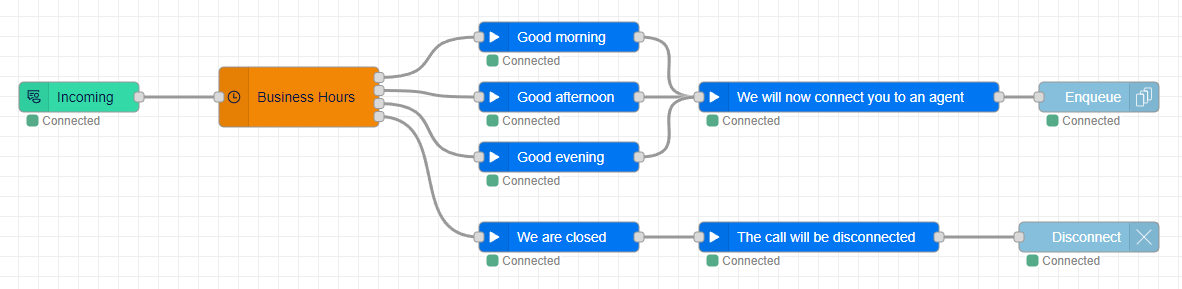
This guide will show you how to set up a message outside of business hours and disconnect the conversation. You can either continue with your flow from the previous guide or copy the JSON from the Flow example.
Tip
If you prefer not to follow the step-by-step guide, you can still get started quickly by downloading the Flow example at the end of this article. This will give you a clear idea of how the process works, and you can use it as a starting point to customize your own flow.
Step 1: Update the Business Hours Node
Double-click the Business Hours node that is already in your flow area. In the Business Hours part, we will be adding a new rule. Change from Weekdays to Otherwise. Otherwise will trigger on all timeslots that aren't configured above. In this example flow, that will be:
-
Workdays: 21:00 - 09:00
-
Weekends
After pressing Done, you will see a new Output being added to the Business Hours node.
Step 2: Add a Message for Outside Business Hours
We want to inform customers what to do outside of business hours, so we will be using another Play node. Enter the URL to a WAV file.
In this example, we will be playing two files:
-
"We are closed for today, please see our website for our business hours"
-
"The call will now be disconnected"
Step 3: Disconnect the Customer
We want to wrap up the flow by disconnecting the customer. You can do this by dragging and dropping a Disconnect node into the flow area. No extra configuration is needed. Link the Play node to the Disconnect node. Optionally, you could also use a different Enqueue node if you have a queue available outside of Business hours.
Step 4: Deploy and Test
Click the Deploy button in the top right corner to deploy the call flow. After clicking this, the call flow is live and you can now call the address you assigned to test. If everything works as expected and you call outside business hours, you should hear the closed message and the call should be disconnected. Congratulations! You have now successfully set up an outside business hours flow.
Flow example
To use the JSON file to compare your callflow or use it as a baseline, follow these steps:
-
Click on the menu button in the top right corner or use the Ctr+I shortcut to open the Import window.
-
Paste the content of the JSON into the field.
-
(Optional) Click "New Flow" if you want to import the Callflow into a different tab.
-
Click "Import".
Once imported, configure the Incoming and Enqueue nodes with the address and queue you want to use.
[{"id":"696e071723eb6783","type":"tab","label":"Learn - Setup an outside Business hour flow","disabled":false,"info":"","env":[]},{"id":"35ae1ea1be26f3c5","type":"anywhere365-incoming","z":"696e071723eb6783","name":"","address":"1265e7fd-6a2b-4c67-9e10-f76eac009fb7","x":220,"y":280,"wires":[["95bfe8800c95cfd6"]]},{"id":"0250a506c7213fbe","type":"anywhere365-play","z":"696e071723eb6783","name":"Good morning","dialogueId":"dialogue.id","dialogueIdType":"msg","audioSource":"audio-source-url","valueUrl":"https://dialoguestudio.anywhere365.io/media/learn-examples/good-morning.wav","valueUrlType":"str","repeat":"0","repeatType":"num","x":700,"y":220,"wires":[["37992d24c2b9640b"]]},{"id":"37992d24c2b9640b","type":"anywhere365-play","z":"696e071723eb6783","name":"We will now connect you to an agent","dialogueId":"dialogue.id","dialogueIdType":"msg","audioSource":"audio-source-url","valueUrl":"https://dialoguestudio.anywhere365.io/media/learn-examples/we-will-now-connect-you-to-an-agent.wav","valueUrlType":"str","repeat":"0","repeatType":"num","x":990,"y":280,"wires":[["e33c7325c294a1b5"]]},{"id":"95bfe8800c95cfd6","type":"anywhere365-settings-bh","z":"696e071723eb6783","name":"","timezone":"Europe/Amsterdam","timezonefilter":"Europe/Amsterdam","businessHours":[{"operator":"weekdays","operands":{"days":[true,true,true,true,true,false,false],"startTime":{"type":"time","value":"09:00"},"endTime":{"type":"time","value":"12:00"}},"label":"Monday, Tuesday, Wednesday, Thursday, Friday (09:00-12:00)"},{"operator":"weekdays","operands":{"days":[true,true,true,true,true,false,false],"startTime":{"type":"time","value":"12:00"},"endTime":{"type":"time","value":"18:00"}},"label":"Monday, Tuesday, Wednesday, Thursday, Friday (12:00-18:00)"},{"operator":"weekdays","operands":{"days":[true,true,true,true,true,false,false],"startTime":{"type":"time","value":"18:00"},"endTime":{"type":"time","value":"21:00"}},"label":"Monday, Tuesday, Wednesday, Thursday, Friday (18:00-21:00)"},{"operator":"otherwise","operands":{},"label":"otherwise"}],"stopOnFirstMatch":true,"time":"","timeType":"msgInput","outputs":4,"x":440,"y":280,"wires":[["0250a506c7213fbe"],["74f2a841d94b5f5f"],["c9819e64002f63d4"],["67ff3929528df204"]]},{"id":"74f2a841d94b5f5f","type":"anywhere365-play","z":"696e071723eb6783","name":"Good afternoon","dialogueId":"dialogue.id","dialogueIdType":"msg","audioSource":"audio-source-url","valueUrl":"https://dialoguestudio.anywhere365.io/media/learn-examples/good-afternoon.wav","valueUrlType":"str","repeat":"0","repeatType":"num","x":700,"y":280,"wires":[["37992d24c2b9640b"]]},{"id":"c9819e64002f63d4","type":"anywhere365-play","z":"696e071723eb6783","name":"Good evening","dialogueId":"dialogue.id","dialogueIdType":"msg","audioSource":"audio-source-url","valueUrl":"https://dialoguestudio.anywhere365.io/media/learn-examples/good-evening.wav","valueUrlType":"str","repeat":"0","repeatType":"num","x":700,"y":340,"wires":[["37992d24c2b9640b"]]},{"id":"67ff3929528df204","type":"anywhere365-play","z":"696e071723eb6783","name":"We are closed","dialogueId":"dialogue.id","dialogueIdType":"msg","audioSource":"audio-source-url","valueUrl":"https://dialoguestudio.anywhere365.io/media/learn-examples/we-are-closed-for-today.wav","valueUrlType":"str","repeat":"0","repeatType":"num","x":700,"y":420,"wires":[["0b0e13a12cea977b"]]},{"id":"0b0e13a12cea977b","type":"anywhere365-play","z":"696e071723eb6783","name":"The call will be disconnected","dialogueId":"dialogue.id","dialogueIdType":"msg","audioSource":"audio-source-url","valueUrl":"https://dialoguestudio.anywhere365.io/media/learn-examples/the-call-will-be-disconnected.wav","valueUrlType":"str","repeat":"0","repeatType":"num","x":960,"y":420,"wires":[["221c61c97d4dd177"]]},{"id":"221c61c97d4dd177","type":"anywhere365-disconnect","z":"696e071723eb6783","name":"","dialogueId":"dialogue.id","dialogueIdType":"msg","x":1230,"y":420,"wires":[]},{"id":"e33c7325c294a1b5","type":"anywhere365-enqueue","z":"696e071723eb6783","name":"","contactCenterSelectedOption":"contact-center-select","contactCenterSelect":"","contactCenterVariableType":"msg","requiredSkillSelectedOption":"required-skill-select","requiredSkillSelect":"","requiredSkillVariableType":"msg","dialogueId":"dialogue.id","dialogueIdType":"msg","x":1240,"y":280,"wires":[]}]