Greeting based on time of day
This guide will show you how to set up a greeting based on the time of day. We will be using workdays from 09:00 to 21:00. You can continue with your flow from the previous guide or copy the JSON from Flow example

Tip
If you prefer not to follow the step-by-step guide, you can still get started quickly by downloading the Flow example at the end of this article. This will give you a clear idea of how the process works, and you can use it as a starting point to customize your own flow.
Step 1: Add a Business Hour Node
Drag and drop the Business Hour node between the Incoming node and the first Play node.
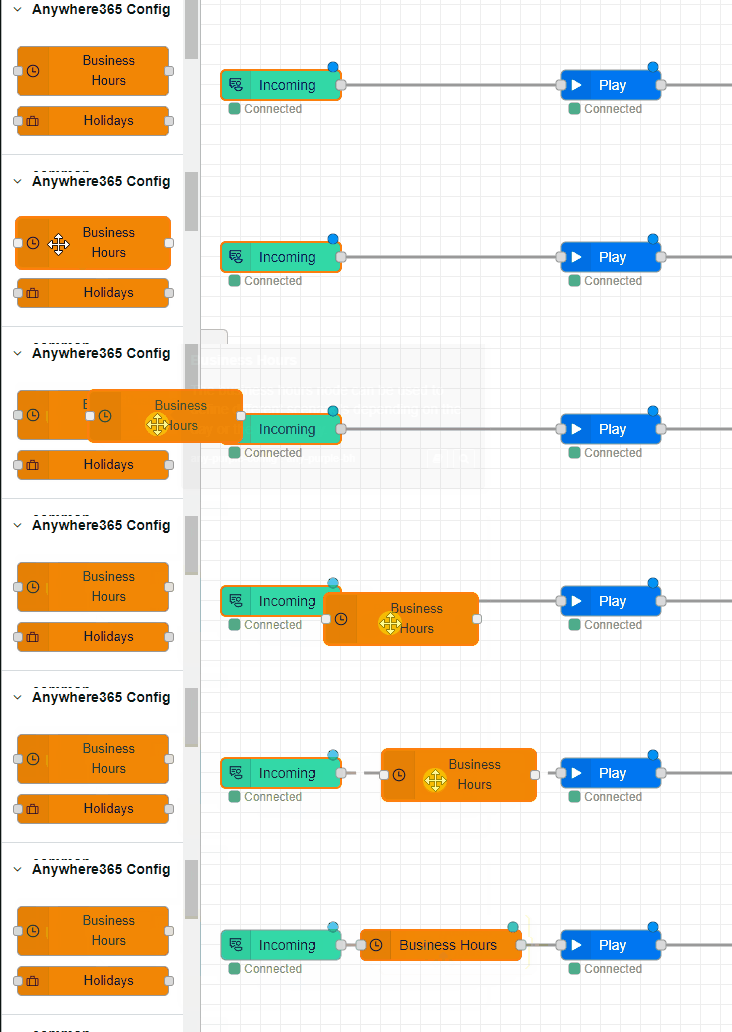
Double-click the Business Hours node to configure it. In the timezone field, enter the timezone you want to use. Fill in the Business hours:
-
Monday to Friday: 09:00 - 12:00
-
Monday to Friday: 12:00 - 18:00
-
Monday to Friday: 18:00 - 21:00
After pressing Done, you will see the Business Hours node now has 3 outputs (gray boxes right of the node).
WARNING: Incomplete call flow!
Please finish the remaining parts of this Learning Path to ensure that customers can be served properly when they call. Failure to do so will result in calls not being answered between 21:00 and 09:00.
Step 2: Configure a Play Node per Time of Day
Drag and drop two more Play nodes next to the Business Hours node and double-click to configure them. In the example at the end of the page, we used:
-
Monday to Friday: 09:00 - 12:00 > "Good morning and Welcome to Infinity"
-
Monday to Friday: 12:00 - 18:00 > "Good afternoon and Welcome to Infinity"
-
Monday to Friday: 18:00 - 21:00 > "Good evening and Welcome to Infinity"
Link the Play nodes to the corresponding gray box right of the Business Hours node.
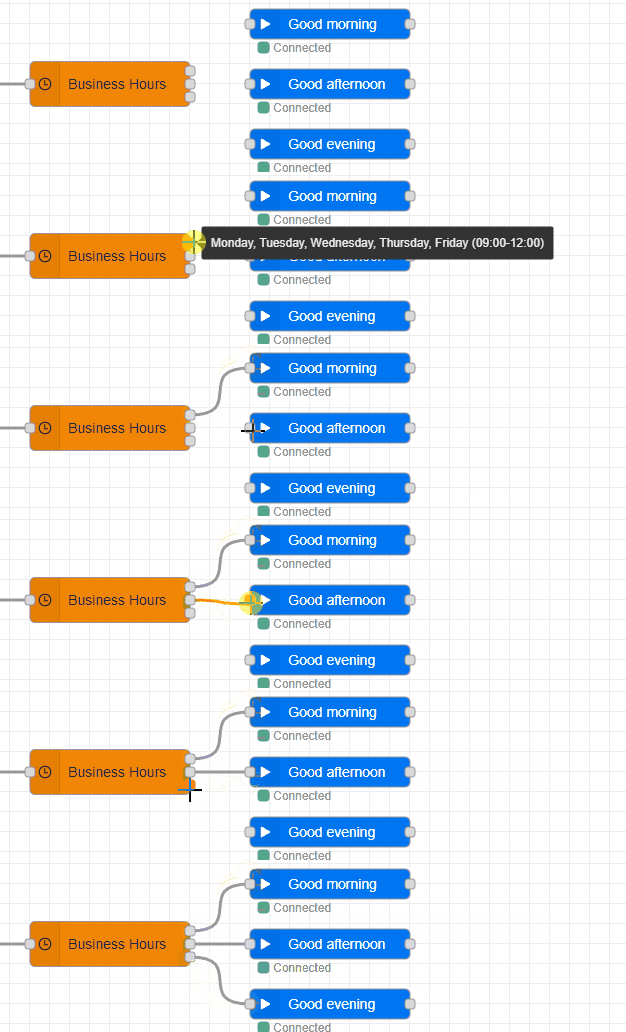
Step 3: Tie Up Loose Ends
Make sure the newly added Play nodes are linked to the Enqueue node. Optionally, you can also add new Enqueue nodes if you want to connect to a different contact center based on the time of day.
Note
Not every contact center needs an address. If you're using Dialogue Studio, you can link one address to different contact centers that don't have an address.
Step 4: Deploy and Test
Click the Deploy button in the top right corner to deploy the call flow. After clicking this, the call flow is live and you can now call the address you assigned to test.
You should now hear the appropriate greeting based on the time of day. Congratulations, you have successfully set up a greeting based on the time of day!
Flow example
To use the JSON file to compare your callflow or use it as a baseline, follow these steps:
-
Click on the menu button in the top right corner or use the Ctr+I shortcut to open the Import window.
-
Paste the content of the JSON into the field.
-
(Optional) Click "New Flow" if you want to import the Callflow into a different tab.
-
Click "Import".
Once imported, configure the Incoming and Enqueue nodes with the address and queue you want to use.
[{"id":"319c5579d190af99","type":"tab","label":"Learn - Greeting based on time of day","disabled":false,"info":"","env":[]},{"id":"6c99140fbba3988f","type":"anywhere365-incoming","z":"319c5579d190af99","name":"","address":"1265e7fd-6a2b-4c67-9e10-f76eac009fb7","x":200,"y":220,"wires":[["3f2453faf690016a"]]},{"id":"e38c1dec5b82ae99","type":"anywhere365-play","z":"319c5579d190af99","name":"Good morning","dialogueId":"dialogue.id","dialogueIdType":"msg","audioSource":"audio-source-url","valueUrl":"https://dialoguestudio.anywhere365.io/media/learn-examples/good-morning.wav","valueUrlType":"str","repeat":"0","repeatType":"num","x":640,"y":160,"wires":[["a6901c3776962319"]]},{"id":"a6901c3776962319","type":"anywhere365-play","z":"319c5579d190af99","name":"We will now connect you to an agent","dialogueId":"dialogue.id","dialogueIdType":"msg","audioSource":"audio-source-url","valueUrl":"https://dialoguestudio.anywhere365.io/media/learn-examples/we-will-now-connect-you-to-an-agent.wav","valueUrlType":"str","repeat":"0","repeatType":"num","x":930,"y":220,"wires":[["e9fded3b48ac244c"]]},{"id":"3f2453faf690016a","type":"anywhere365-settings-bh","z":"319c5579d190af99","name":"","timezone":"Europe/Amsterdam","timezonefilter":"Europe/Amsterdam","businessHours":[{"operator":"weekdays","operands":{"days":[true,true,true,true,true,false,false],"startTime":{"type":"time","value":"09:00"},"endTime":{"type":"time","value":"12:00"}},"label":"Monday, Tuesday, Wednesday, Thursday, Friday (09:00-12:00)"},{"operator":"weekdays","operands":{"days":[true,true,true,true,true,false,false],"startTime":{"type":"time","value":"12:00"},"endTime":{"type":"time","value":"18:00"}},"label":"Monday, Tuesday, Wednesday, Thursday, Friday (12:00-18:00)"},{"operator":"weekdays","operands":{"days":[true,true,true,true,true,false,false],"startTime":{"type":"time","value":"18:00"},"endTime":{"type":"time","value":"21:00"}},"label":"Monday, Tuesday, Wednesday, Thursday, Friday (18:00-21:00)"}],"stopOnFirstMatch":true,"time":"","timeType":"msgInput","outputs":3,"x":420,"y":220,"wires":[["e38c1dec5b82ae99"],["dca1c30502ff7491"],["1e8b94aef8667e80"]]},{"id":"dca1c30502ff7491","type":"anywhere365-play","z":"319c5579d190af99","name":"Good afternoon","dialogueId":"dialogue.id","dialogueIdType":"msg","audioSource":"audio-source-url","valueUrl":"https://dialoguestudio.anywhere365.io/media/learn-examples/good-afternoon.wav","valueUrlType":"str","repeat":"0","repeatType":"num","x":640,"y":220,"wires":[["a6901c3776962319"]]},{"id":"1e8b94aef8667e80","type":"anywhere365-play","z":"319c5579d190af99","name":"Good evening","dialogueId":"dialogue.id","dialogueIdType":"msg","audioSource":"audio-source-url","valueUrl":"https://dialoguestudio.anywhere365.io/media/learn-examples/good-evening.wav","valueUrlType":"str","repeat":"0","repeatType":"num","x":640,"y":280,"wires":[["a6901c3776962319"]]},{"id":"e9fded3b48ac244c","type":"anywhere365-enqueue","z":"319c5579d190af99","name":"","contactCenterSelectedOption":"contact-center-select","contactCenterSelect":"","contactCenterVariableType":"msg","requiredSkillSelectedOption":"required-skill-select","requiredSkillSelect":"","requiredSkillVariableType":"msg","dialogueId":"dialogue.id","dialogueIdType":"msg","x":1180,"y":220,"wires":[]}]Next Steps
Setting up an outside business hours flow in Dialogue Studio